
Appearance
Weekly commitments
Who this is for: Admin, Tenant owner
What you'll achieve: Record recurring teaching and cover blocks so the timetable shows who is already booked
Requires role
config.manage — Tenant owner or Admin
Before you begin
People must exist in the staff directory.
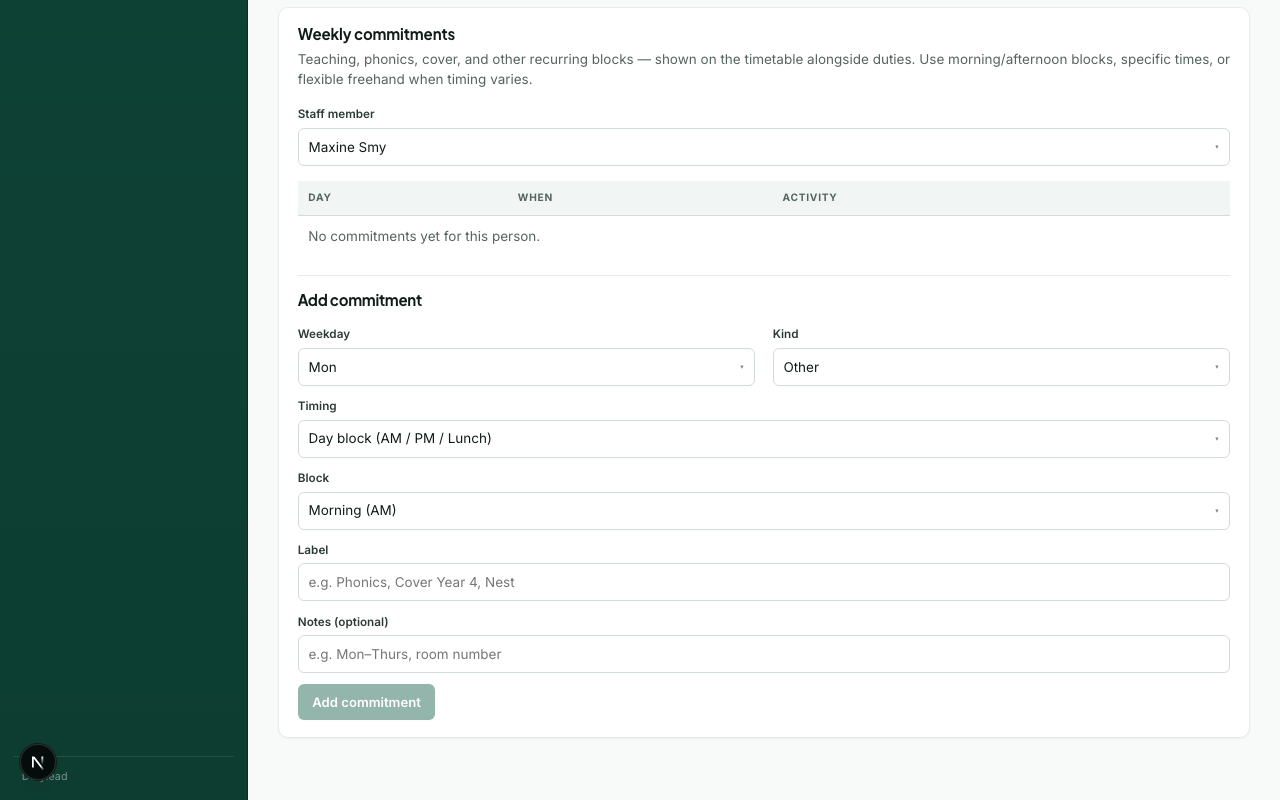
What commitments are for
Commitments capture recurring blocks such as:
- Phonics / intervention
- Class cover
- PPA
- Meetings
- Nest / other specialist blocks
They appear on Timetable alongside duties so duty leads can see conflicts at a glance.
Steps
- Open Staff and select a person (or open commitments from the Timetable person card if available).
- Add a commitment with:
- Kind (phonics, intervention, class cover, PPA, meeting, nest, other)
- Day of week
- Timing — AM/PM/lunch block, specific times, or freehand
- Save.
- Open Timetable and confirm the block appears on the person board or timeline.
You can also edit commitments inline on busy person cards when you have config.manage.
What happens next
Troubleshooting
| Problem | What to try |
|---|---|
| Commitment not visible | Check the Timetable filters (staff member / activity type) |
| Wrong day | Confirm weekday and week picker on Timetable |